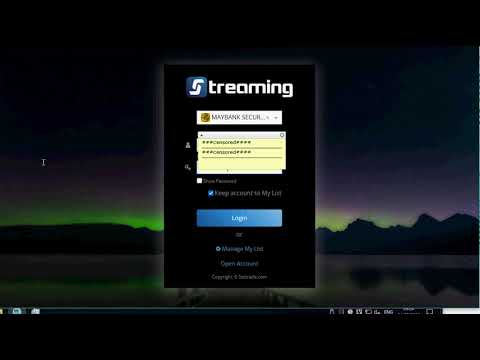
อันนี้เป็น pain point ส่วนตัวกับ UI ของ โปรแกรม settrade streaming บน PC เป็นอย่างมาก ส่ง feedback ไปหลายรอบไม่เคยปรับปรุงเรื่องให้คลิกหลายๆ หน้าต่าง กว่าจะถึงหน้า OTP
ส่วนตัวใช้ otp เพราะเร็วกว่าวิธีอื่นๆ แต่กลับต้องคลิกเยอะกว่า
ผมใช้บน windows firefox และโบรค maybank ไม่มั่นใจว่าระบบอื่นๆ โบรคอื่นๆ หน้าตาจะเหมือนกันหรือไม่
สำหรับท่านที่สนใจและขี้เกียจ แต่ขยันหาวิธีทำ automation ต่างๆ ลองดูได้
ใช้ได้เฉพาะกับการ save user/pass ไว้ล่วงหน้าแล้ว script แค่ช่วยกดปุ่ม login และปุ่มต่างๆ ในหน้าถัดไปเท่านั้น
ก่อนอื่นโหลด browser extension หากยังไม่มี
https://www.tampermonkey.net
ใช้ได้กับทุกเบราเซอร์ และนำไปประยุกต์กับงาน automation ได้มากมาย ใช้ AI ช่วยเขียนสริปได้ ง่ายมาก ไม่ต้องเรียนรู้โค้ด
ต่อไป
กดที่ tampermoney > create a new script
copy paste script ด้านล่างนี้ ไปวาง วางทับทุกอย่างที่โปรแกรมสร้างไว้ให้ก่อนได้เลย
[Spoil] คลิกเพื่อดูข้อความที่ซ่อนไว้// ==UserScript==
// @name Settrade Streaming Auto-Login
// @namespace https://streaming.settrade.com/
// @version 1.5
// @description Auto-clicks Login, Continue, then "here" + "Get SMS OTP" on the select-verification page. Handles Angular hash routing.
// @author You
// @match https://streaming.settrade.com/realtime/streaming-login/login.jsp*
// @match https://*.settrade.com/twofa/login.jsp*
// @grant none
// ==/UserScript==
(function () {
'use strict';
// Initial delay (ms) before the first action, to let the page load and
// credentials get pre-filled. Reduced to 2s per your request.
const INITIAL_DELAY_MS = 2000;
// Poll every this many ms after the initial delay. Keeps running so we can
// react to Angular in-page hash navigation (no full page reload).
const POLL_INTERVAL_MS = 500;
// Stop after this long (ms) to avoid polling forever.
const MAX_RUN_MS = 300000; // 5 minutes
// Guard flags so we never re-click the same action twice on the same page.
var clicked = {
loginDone: false,
continueDone: fals Done: false,
otpDone: false
};
// ---- Element helpers ----
function findById(id) {
return document.getElementById(id);
}
// Returns the first <button> whose text matches. exactMatch=false means
// "contains" (case-insensitive).
function findButtonByText(text, exactMatch) {
var buttons = document.querySelectorAll('button');
var target = text.toLowerCase();
for (var i = 0; i < buttons.length; i++) {
var btnText = (buttons.innerText || '').trim().toLowerCase();
var matches = exactMatch ? (btnText === target) : (btnText.indexOf(target) !== -1);
if (matches) {
return buttons;
}
}
return null;
}
// ---- Actions ----
function doLogin() {
var btn = findById('submitBtn');
if (!btn) return;
console.log('[Auto-Login] Clicking Login (#submitBtn).');
btn.click();
clicked.loginDone = true;
}
function doContinue() {
var btn = findButtonByText('continue', true);
if (!btn) return;
console.log('[Auto-Login] Clicking Continue.');
btn.click();
clicked.continueDone = true;
}
function doHere() {
var link = document.querySelector('.instruction-link');
if (!link) return;
console.log('[Auto-Login] Clicking "here" link.');
link.click();
clicked.hereDone = true;
}
function doSmsOtp() {
var btn = findButtonByText('get sms otp', false);
if (!btn) return;
console.log('[Auto-Login] Clicking "Get SMS OTP".');
btn.click();
clicked.otpDone = true;
}
// ---- Which page are we on? ----
function currentStage() {
var path = window.location.pathname;
var hash = window.location.hash || '';
if (path.indexOf('streaming-login/login.jsp') !== -1) {
return 'login';
}
if (path.indexOf('twofa/login.jsp') !== -1) {
return hash.indexOf('select-verification') !== -1 ? 'select' : 'confirm';
}
return 'other';
}
// ---- Act according to the current page. Returns true if there is more
// work to do (script should keep polling). ----
function step() {
var stage = currentStage();
if (stage === 'login' && !clicked.loginDone) {
doLogin();
} else if (stage === 'confirm' && !clicked.continueDone) {
doContinue();
} else if (stage === 'select') {
if (!clicked.hereDone) {
doHere();
}
if (!clicked.otpDone) {
doSmsOtp();
}
}
// Keep running until we've reached and clicked Get SMS OTP.
// (After that, the user may add further steps later.)
return !clicked.otpDone;
}
// Wait the initial delay, then poll.
window.setTimeout(function () {
var startedAt = Date.now();
var run = function () {
// Keep going while step() says there's still work AND we're not
// past the deadline.
var more = step();
if (more && Date.now() - startedAt < MAX_RUN_MS) {
window.setTimeout(run, POLL_INTERVAL_MS);
} else if (!more) {
console.log('[Auto-Login] Flow completed up to "Get SMS OTP".');
} else {
console.warn('[Auto-Login] Timed out waiting for the flow to finish.');
}
};
run();
}, INITIAL_DELAY_MS);
})();
กด File > Save เป็นอันจบ
ลองเข้า streaming >>
https://streaming.settrade.com/realtime/streaming-login/login.jsp
หาก user/pass prefill ไว้แล้ว ก็นั่งเฉยๆ รอกรอก otp ได้เลย สามารถแก้ script ให้ช่วยกรอก user/pass ได้












แจก script สำหรับ auto login settrade streaming บน PC สำหรับคนขี้เกียจคลิก
ส่วนตัวใช้ otp เพราะเร็วกว่าวิธีอื่นๆ แต่กลับต้องคลิกเยอะกว่า
ผมใช้บน windows firefox และโบรค maybank ไม่มั่นใจว่าระบบอื่นๆ โบรคอื่นๆ หน้าตาจะเหมือนกันหรือไม่
สำหรับท่านที่สนใจและขี้เกียจ แต่ขยันหาวิธีทำ automation ต่างๆ ลองดูได้
ใช้ได้เฉพาะกับการ save user/pass ไว้ล่วงหน้าแล้ว script แค่ช่วยกดปุ่ม login และปุ่มต่างๆ ในหน้าถัดไปเท่านั้น
ก่อนอื่นโหลด browser extension หากยังไม่มี
https://www.tampermonkey.net
ใช้ได้กับทุกเบราเซอร์ และนำไปประยุกต์กับงาน automation ได้มากมาย ใช้ AI ช่วยเขียนสริปได้ ง่ายมาก ไม่ต้องเรียนรู้โค้ด
ต่อไป
กดที่ tampermoney > create a new script
copy paste script ด้านล่างนี้ ไปวาง วางทับทุกอย่างที่โปรแกรมสร้างไว้ให้ก่อนได้เลย
[Spoil] คลิกเพื่อดูข้อความที่ซ่อนไว้
กด File > Save เป็นอันจบ
ลองเข้า streaming >> https://streaming.settrade.com/realtime/streaming-login/login.jsp
หาก user/pass prefill ไว้แล้ว ก็นั่งเฉยๆ รอกรอก otp ได้เลย สามารถแก้ script ให้ช่วยกรอก user/pass ได้