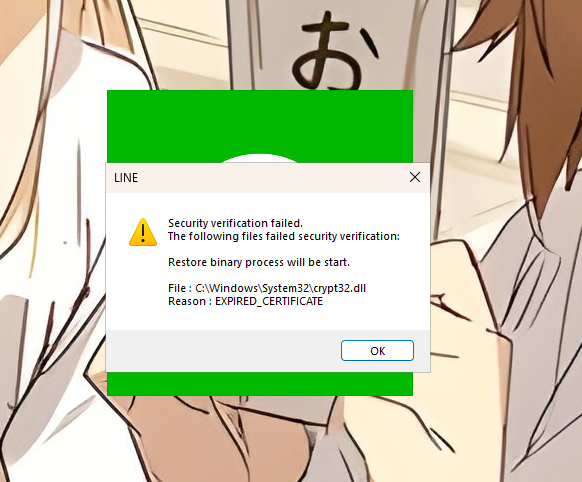
อยู่ๆก็เป็นเลยโดยที่ไม่รู้ว่ามันมาจากไหนแล้วก็ใช้งานไม่ได้เลย
Host Name: LAPTOP-AKUSC5V
OS Name: Microsoft Windows 11 Pro for Workstations Insider Preview
OS Version: 10.0.26300 N/A Build 26300.8935 26H2
OS Manufacturer: Microsoft Corporation
OS Configuration: Standalone Workstation
OS Build Type: Multiprocessor Free
Registered Owner: N/A
Registered Organization: N/A
Product ID: 00391-70000-00000-AA653
Original Install Date: 05/30/2026, 10:44:57
System Boot Time: 08/15/2026, 22:00:39
System Manufacturer: ASUSTeK COMPUTER INC.
System Model: Vivobook_ASUSLaptop M6500QC_D6500QC
System Type: x64-based PC
Processor(s): 1 Processor(s) Installed.
[01]: AMD64 Family 25 Model 80 Stepping 0 AuthenticAMD ~3301 Mhz
BIOS Version: American Megatrends International, LLC. M6500QC.314, 03/22/2024
Windows Directory: C:\WINDOWS
System Directory: C:\WINDOWS\system32
Boot Device: \Device\HarddiskVolume1
System Locale: th;Thai
Input Locale: en-us;English (United States)
Time Zone: (UTC+07:00) Bangkok, Hanoi, Jakarta
Total Physical Memory: 15,773 MB
Available Physical Memory: 1,810 MB
Virtual Memory: Max Size: 31,547 MB
Virtual Memory: Available: 17,901 MB
Virtual Memory: In Use: 13,646 MB
Page File Location(s): C:\pagefile.sys
Domain: WORKGROUP
Logon Server: \\LAPTOP-AKUSC5V
Hotfix(s): 4 Hotfix(s) Installed.
[01]: KB5100998
[02]: KB5073032
[03]: KB5101589
[04]: KB5101582
Network Card(s): 6 NIC(s) Installed.
[01]: ASIX USB to Gigabit Ethernet Family Adapter
Connection Name: Ethernet 3
DHCP Enabled: No
IP address(es)
[01]: 192.168.1.151
[02]: fe80::55f7:189d:5f92:3b0e
[03]: 2403:6200:8892:2423:e4c2:f8dd:db7:f924
[04]: 2403:6200:8892:2423:b6d5:1c68:77a:cbca
[05]: 2403:6200:8892:2423::5
[02]: MediaTek Wi-Fi 6 MT7921 Wireless LAN Card
Connection Name: Wi-Fi
Status: Media disconnected
[03]: Microsoft Wi-Fi Direct Virtual Adapter
Connection Name: Local Area Connection* 2
DHCP Enabled: No
IP address(es)
[01]: 192.168.137.1
[02]: fe80::6bf4:f4f:e511:32df
[04]: Bluetooth Device (Personal Area Network)
Connection Name: Bluetooth Network Connection
Status: Media disconnected
[05]: VMware Virtual Ethernet Adapter for VMnet1
Connection Name: VMware Network Adapter VMnet1
DHCP Enabled: Yes
DHCP Server: 192.168.16.254
IP address(es)
[01]: 192.168.16.1
[02]: fe80::4de:ba78:5d3f:e36b
[06]: VMware Virtual Ethernet Adapter for VMnet8
Connection Name: VMware Network Adapter VMnet8
DHCP Enabled: Yes
DHCP Server: 192.168.88.254
IP address(es)
[01]: 192.168.88.1
[02]: fe80::f74c:7471:489:1968
Virtualization-based security: Status: Running
Required Security Properties:
Available Security Properties:
Base Virtualization Support
Secure Boot
DMA Protection
Secure Memory Overwrite
UEFI Code Readonly
Mode Based Execution Control
Services Configured:
Hypervisor enforced Code Integrity
Services Running:
Hypervisor enforced Code Integrity
App Control for Business policy: Enforced
App Control for Business user mode policy: Off
Security Features Enabled:
Hyper-V Requirements: A hypervisor has been detected. Features required for Hyper-V will not be displayed.













เปิดไลน์ในคอมไม่ได้
อยู่ๆก็เป็นเลยโดยที่ไม่รู้ว่ามันมาจากไหนแล้วก็ใช้งานไม่ได้เลย
Host Name: LAPTOP-AKUSC5V
OS Name: Microsoft Windows 11 Pro for Workstations Insider Preview
OS Version: 10.0.26300 N/A Build 26300.8935 26H2
OS Manufacturer: Microsoft Corporation
OS Configuration: Standalone Workstation
OS Build Type: Multiprocessor Free
Registered Owner: N/A
Registered Organization: N/A
Product ID: 00391-70000-00000-AA653
Original Install Date: 05/30/2026, 10:44:57
System Boot Time: 08/15/2026, 22:00:39
System Manufacturer: ASUSTeK COMPUTER INC.
System Model: Vivobook_ASUSLaptop M6500QC_D6500QC
System Type: x64-based PC
Processor(s): 1 Processor(s) Installed.
[01]: AMD64 Family 25 Model 80 Stepping 0 AuthenticAMD ~3301 Mhz
BIOS Version: American Megatrends International, LLC. M6500QC.314, 03/22/2024
Windows Directory: C:\WINDOWS
System Directory: C:\WINDOWS\system32
Boot Device: \Device\HarddiskVolume1
System Locale: th;Thai
Input Locale: en-us;English (United States)
Time Zone: (UTC+07:00) Bangkok, Hanoi, Jakarta
Total Physical Memory: 15,773 MB
Available Physical Memory: 1,810 MB
Virtual Memory: Max Size: 31,547 MB
Virtual Memory: Available: 17,901 MB
Virtual Memory: In Use: 13,646 MB
Page File Location(s): C:\pagefile.sys
Domain: WORKGROUP
Logon Server: \\LAPTOP-AKUSC5V
Hotfix(s): 4 Hotfix(s) Installed.
[01]: KB5100998
[02]: KB5073032
[03]: KB5101589
[04]: KB5101582
Network Card(s): 6 NIC(s) Installed.
[01]: ASIX USB to Gigabit Ethernet Family Adapter
Connection Name: Ethernet 3
DHCP Enabled: No
IP address(es)
[01]: 192.168.1.151
[02]: fe80::55f7:189d:5f92:3b0e
[03]: 2403:6200:8892:2423:e4c2:f8dd:db7:f924
[04]: 2403:6200:8892:2423:b6d5:1c68:77a:cbca
[05]: 2403:6200:8892:2423::5
[02]: MediaTek Wi-Fi 6 MT7921 Wireless LAN Card
Connection Name: Wi-Fi
Status: Media disconnected
[03]: Microsoft Wi-Fi Direct Virtual Adapter
Connection Name: Local Area Connection* 2
DHCP Enabled: No
IP address(es)
[01]: 192.168.137.1
[02]: fe80::6bf4:f4f:e511:32df
[04]: Bluetooth Device (Personal Area Network)
Connection Name: Bluetooth Network Connection
Status: Media disconnected
[05]: VMware Virtual Ethernet Adapter for VMnet1
Connection Name: VMware Network Adapter VMnet1
DHCP Enabled: Yes
DHCP Server: 192.168.16.254
IP address(es)
[01]: 192.168.16.1
[02]: fe80::4de:ba78:5d3f:e36b
[06]: VMware Virtual Ethernet Adapter for VMnet8
Connection Name: VMware Network Adapter VMnet8
DHCP Enabled: Yes
DHCP Server: 192.168.88.254
IP address(es)
[01]: 192.168.88.1
[02]: fe80::f74c:7471:489:1968
Virtualization-based security: Status: Running
Required Security Properties:
Available Security Properties:
Base Virtualization Support
Secure Boot
DMA Protection
Secure Memory Overwrite
UEFI Code Readonly
Mode Based Execution Control
Services Configured:
Hypervisor enforced Code Integrity
Services Running:
Hypervisor enforced Code Integrity
App Control for Business policy: Enforced
App Control for Business user mode policy: Off
Security Features Enabled:
Hyper-V Requirements: A hypervisor has been detected. Features required for Hyper-V will not be displayed.