จากกระทู้นี้ครับ
https://pantip.com/topic/43947625/comment1
ทางais ให้ไปติดต่อเอง ผมเลยemailไปสอบถาม ได้คำตอบแบบนี้
อีเมลฉบับนี้เกี่ยวข้องกับข้อกังวลของคุณเกี่ยวกับปัญหาการเรียกเก็บเงิน Google One หลังจากที่คุณอัปเกรดแพ็กเกจเป็น 200 GB แล้ว แต่ยังคงได้รับการแจ้งเตือนการชำระเงินสำหรับแพ็กเกจ 100 GB ไม่ต้องกังวล ฉันจะพยายามอย่างเต็มที่เพื่อแก้ไขปัญหานี้ให้คุณ
เป็นเรื่องปกติที่จะรู้สึกสับสนเมื่อเห็นการแจ้งเตือนการเรียกเก็บเงินหลังจากอัปเกรด โดยปกติแล้ว สิ่งนี้เกิดขึ้นเนื่องจาก Google "แปลง" ยอดคงเหลือจากแพ็กเกจเก่าของคุณเป็น "เครดิต" สำหรับแพ็กเกจใหม่ แทนที่จะยกเลิกแพ็กเกจเก่าโดยตรง
นี่คือขั้นตอนในการแก้ไขปัญหานี้และตรวจสอบสถานะบัญชีของคุณ:
เมื่อคุณอัปเกรดจาก 100 GB เป็น 200 GB Google ไม่ได้เรียกเก็บเงินราคาเต็มรายปีทันทีเสมอไป แต่พวกเขามักจะนำเงินที่คุณชำระไปแล้วสำหรับแพ็กเกจ 100 GB มาแปลงเป็นจำนวนวันสำหรับแพ็กเกจ 200 GB
ผลลัพธ์: คุณอาจได้รับการแจ้งเตือนว่า "การชำระเงินครั้งถัดไป" ของคุณจะครบกำหนดเร็วกว่าหนึ่งปีนับจากนี้ (เช่น ใน 6 เดือนแทนที่จะเป็น 12 เดือน) เนื่องจากแพ็กเกจ 100GB ถูก "ใช้" เร็วกว่าโดยแพ็กเกจ 200GB ที่มีราคาแพงกว่า
วิธีตรวจสอบ: ไปที่ one.google.com/settings และดูที่ "บิลครั้งถัดไป" เพื่อดูว่าวันที่ได้เปลี่ยนไปหรือไม่
หากคุณได้รับการแจ้งเตือน "การชำระเงินล้มเหลว" หรือ "ต้องดำเนินการ" สำหรับ 100GB คุณอาจมีการสมัครใช้งานสองรายการจากแหล่งที่มาต่างกันโดยไม่ได้ตั้งใจ ซึ่งเกิดขึ้นหากคุณสมัครใช้งานครั้งแรกผ่าน iPhone (Apple App Store) แต่ได้อัปเกรดผ่านคอมพิวเตอร์หรือ Android (Google Play)
ขั้นตอนที่ 1: ตรวจสอบ payments.google.com ภายใต้ การสมัครใช้งานและบริการ
ขั้นตอนที่ 2: ตรวจสอบการสมัครใช้งาน Apple ID ของคุณ (หากคุณใช้ iPhone)
ขั้นตอนที่ 1: ตรวจสอบที่ payments.google.com ภายใต้ การสมัครใช้งานและบริการ
ขั้นตอนที่ 2: ตรวจสอบการสมัครใช้งาน Apple ID ของคุณ (หากคุณใช้ iPhone) วิธีแก้ไข: หากคุณเห็นทั้งสองอย่าง คุณต้องยกเลิกแพ็กเกจ 100GB ด้วยตนเองในร้านค้าที่คุณซื้อแพ็กเกจนั้นมา
ล้างการแจ้งเตือน:
บางครั้ง Google Play Store หรือแอป Gmail อาจเก็บแบนเนอร์ "พื้นที่เก็บข้อมูลเต็ม" หรือ "ต้องชำระเงิน" เก่าๆ ไว้ แม้ว่าการอัปเกรดจะสำเร็จแล้วก็ตาม
วิธีแก้ไข (Android): ไปที่ การตั้งค่า > แอป > Google Play Store > พื้นที่เก็บข้อมูล > ล้างแคช
วิธีแก้ไข (เบราว์เซอร์): ออกจากระบบบัญชี Google ของคุณแล้วเข้าสู่ระบบใหม่ หรือเปิด drive.google.com ในหน้าต่างไม่ระบุตัวตนเพื่อดูว่าแถบพื้นที่เก็บข้อมูลแสดง 200GB อย่างถูกต้องหรือไม่
รอ 24-48 ชั่วโมง
ระบบการเรียกเก็บเงินและโควต้าพื้นที่เก็บข้อมูลของ Google อาจใช้เวลาถึง 24 ชั่วโมง (และบางครั้ง 48 ชั่วโมง) ในการซิงค์ข้อมูลในทุกแอป (Gmail, Drive, Photos) หากคุณอัปเกรดในวันนี้ ระบบ "แจ้งเตือน" 100GB อาจยังไม่รับรู้ว่าคุณได้เปลี่ยนไปใช้แพ็กเกจ 200GB แล้ว
หวังว่าข้อมูลนี้จะเป็นประโยชน์กับคุณนะคะ
ต้นฉบับ
Greetings for the day. My name is Aditya from Google One support. We thank you for your time reaching out to us !
This email is in reference to your concern where you have issues with the Google One charges and you when you have upgraded your plan for the 200 GB and still you have received an payment notification for the 100 GB plan. don't worry I I will try my best to resolve this issue for you.
It is common to feel confused when you see billing alerts after an upgrade. Usually, this happens because Google "converts" your remaining balance from the old plan into "credit" for the new one, rather than just canceling the old one outright.
Here are the steps to resolve this and verify your account status:
When you upgrade from 100GB to 200GB, Google doesn't always charge the full annual price immediately. Instead, they often take the money you already paid for the 100GB plan and convert it into days for the 200GB plan.
The Result: You might receive a notification saying your "Next Payment" is due much sooner than a year from now (e.g., in 6 months instead of 12) because the 100GB payment was "consumed" faster by the more expensive 200GB plan.
How to verify: Go to
one.google.com/settings and look at "Next bill" to see if the date has shifted.
If you are receiving actual "Payment Failed" or "Action Required" notifications for 100GB, you might accidentally have two active subscriptions from different sources. This happens if you originally subscribed via an iPhone (Apple App Store) but upgraded via a computer or Android (Google Play).
Step 1: Check
payments.google.com under Subscriptions & services.
Step 2: Check your Apple ID Subscriptions (if you use an iPhone).
The Fix: If you see both, you must manually cancel the 100GB plan in the store where it was originally purchased.
Clear the Notification :
Sometimes the Google Play Store or Gmail app caches old "Storage Full" or "Payment Required" banners even after the upgrade is successful.
The Fix (Android): Go to Settings > Apps > Google Play Store > Storage > Clear Cache.
The Fix (Browser): Log out of your Google account and log back in, or open
drive.google.com in an Incognito Window to see if the storage bar correctly shows 200GB.
Wait 24–48 Hours
Google’s billing systems and storage quotas can take up to 24 hours (and occasionally 48) to sync across all apps (Gmail, Drive, Photos). If you upgraded today, the 100GB "reminder" system might simply not have realized you moved to the 200GB tier yet.
I hope this information helped you.
In case you have any questions or if you would like to get an update, feel free to reply to the same email and we will be more than happy to assist you.
Thanks,
แพ็กเกจเดิม รายเดือน 100 GB 70บาท จะตัดรอบจ่ายเงินทุกวันที่ 26 ของเดือน ล่าสุดจ่ายไป 26 ธ.ค.2568
แล้วมาอัพเกรด เป็นรายปี 200GB 990บาท สมัครไปวันที่ 16 ม.ค.2569
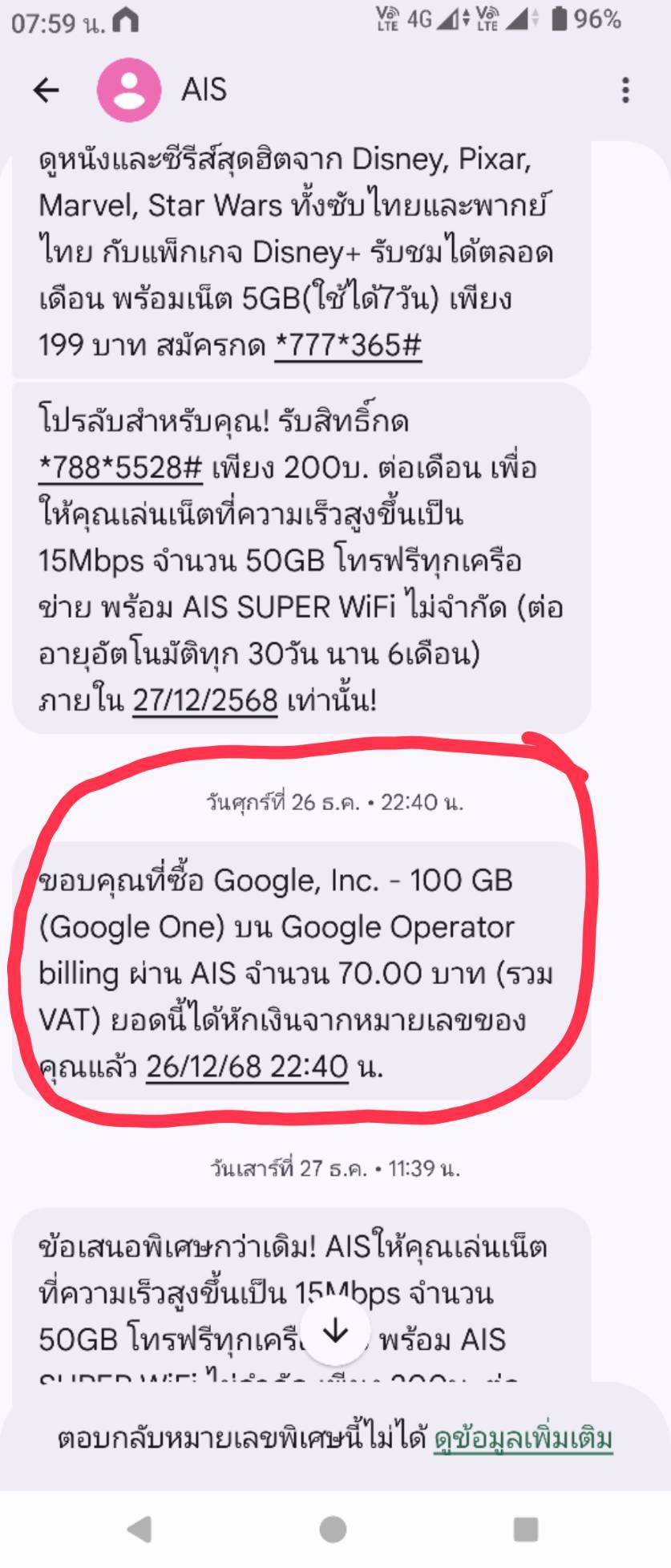
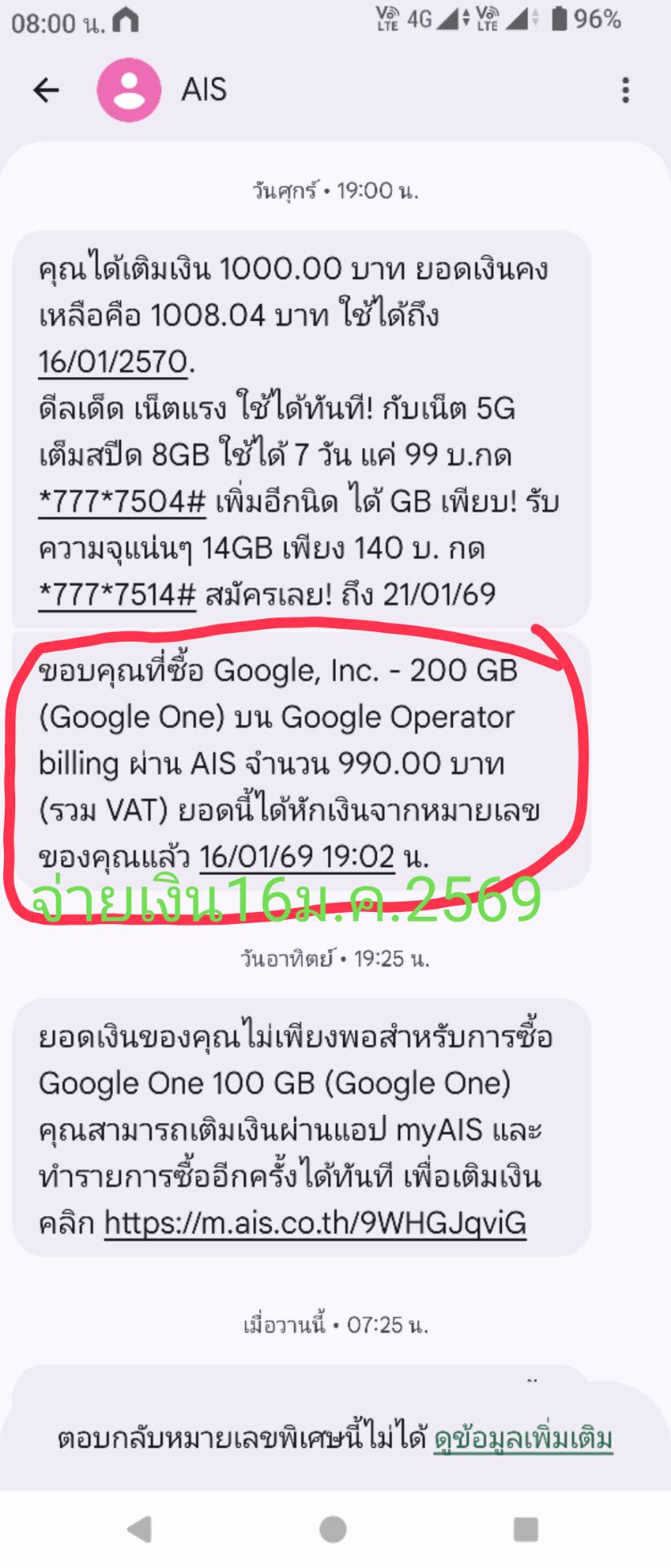










ใครเก่งเรื่อง google one บ้างครับ สงสัยว่าทำไมโดนแจ้งเตือนหักเงินแพ็กเกจเดิมอีก ทั้งที่upgradeแล้ว
https://pantip.com/topic/43947625/comment1
ทางais ให้ไปติดต่อเอง ผมเลยemailไปสอบถาม ได้คำตอบแบบนี้
อีเมลฉบับนี้เกี่ยวข้องกับข้อกังวลของคุณเกี่ยวกับปัญหาการเรียกเก็บเงิน Google One หลังจากที่คุณอัปเกรดแพ็กเกจเป็น 200 GB แล้ว แต่ยังคงได้รับการแจ้งเตือนการชำระเงินสำหรับแพ็กเกจ 100 GB ไม่ต้องกังวล ฉันจะพยายามอย่างเต็มที่เพื่อแก้ไขปัญหานี้ให้คุณ
เป็นเรื่องปกติที่จะรู้สึกสับสนเมื่อเห็นการแจ้งเตือนการเรียกเก็บเงินหลังจากอัปเกรด โดยปกติแล้ว สิ่งนี้เกิดขึ้นเนื่องจาก Google "แปลง" ยอดคงเหลือจากแพ็กเกจเก่าของคุณเป็น "เครดิต" สำหรับแพ็กเกจใหม่ แทนที่จะยกเลิกแพ็กเกจเก่าโดยตรง
นี่คือขั้นตอนในการแก้ไขปัญหานี้และตรวจสอบสถานะบัญชีของคุณ:
เมื่อคุณอัปเกรดจาก 100 GB เป็น 200 GB Google ไม่ได้เรียกเก็บเงินราคาเต็มรายปีทันทีเสมอไป แต่พวกเขามักจะนำเงินที่คุณชำระไปแล้วสำหรับแพ็กเกจ 100 GB มาแปลงเป็นจำนวนวันสำหรับแพ็กเกจ 200 GB
ผลลัพธ์: คุณอาจได้รับการแจ้งเตือนว่า "การชำระเงินครั้งถัดไป" ของคุณจะครบกำหนดเร็วกว่าหนึ่งปีนับจากนี้ (เช่น ใน 6 เดือนแทนที่จะเป็น 12 เดือน) เนื่องจากแพ็กเกจ 100GB ถูก "ใช้" เร็วกว่าโดยแพ็กเกจ 200GB ที่มีราคาแพงกว่า
วิธีตรวจสอบ: ไปที่ one.google.com/settings และดูที่ "บิลครั้งถัดไป" เพื่อดูว่าวันที่ได้เปลี่ยนไปหรือไม่
หากคุณได้รับการแจ้งเตือน "การชำระเงินล้มเหลว" หรือ "ต้องดำเนินการ" สำหรับ 100GB คุณอาจมีการสมัครใช้งานสองรายการจากแหล่งที่มาต่างกันโดยไม่ได้ตั้งใจ ซึ่งเกิดขึ้นหากคุณสมัครใช้งานครั้งแรกผ่าน iPhone (Apple App Store) แต่ได้อัปเกรดผ่านคอมพิวเตอร์หรือ Android (Google Play)
ขั้นตอนที่ 1: ตรวจสอบ payments.google.com ภายใต้ การสมัครใช้งานและบริการ
ขั้นตอนที่ 2: ตรวจสอบการสมัครใช้งาน Apple ID ของคุณ (หากคุณใช้ iPhone)
ขั้นตอนที่ 1: ตรวจสอบที่ payments.google.com ภายใต้ การสมัครใช้งานและบริการ
ขั้นตอนที่ 2: ตรวจสอบการสมัครใช้งาน Apple ID ของคุณ (หากคุณใช้ iPhone) วิธีแก้ไข: หากคุณเห็นทั้งสองอย่าง คุณต้องยกเลิกแพ็กเกจ 100GB ด้วยตนเองในร้านค้าที่คุณซื้อแพ็กเกจนั้นมา
ล้างการแจ้งเตือน:
บางครั้ง Google Play Store หรือแอป Gmail อาจเก็บแบนเนอร์ "พื้นที่เก็บข้อมูลเต็ม" หรือ "ต้องชำระเงิน" เก่าๆ ไว้ แม้ว่าการอัปเกรดจะสำเร็จแล้วก็ตาม
วิธีแก้ไข (Android): ไปที่ การตั้งค่า > แอป > Google Play Store > พื้นที่เก็บข้อมูล > ล้างแคช
วิธีแก้ไข (เบราว์เซอร์): ออกจากระบบบัญชี Google ของคุณแล้วเข้าสู่ระบบใหม่ หรือเปิด drive.google.com ในหน้าต่างไม่ระบุตัวตนเพื่อดูว่าแถบพื้นที่เก็บข้อมูลแสดง 200GB อย่างถูกต้องหรือไม่
รอ 24-48 ชั่วโมง
ระบบการเรียกเก็บเงินและโควต้าพื้นที่เก็บข้อมูลของ Google อาจใช้เวลาถึง 24 ชั่วโมง (และบางครั้ง 48 ชั่วโมง) ในการซิงค์ข้อมูลในทุกแอป (Gmail, Drive, Photos) หากคุณอัปเกรดในวันนี้ ระบบ "แจ้งเตือน" 100GB อาจยังไม่รับรู้ว่าคุณได้เปลี่ยนไปใช้แพ็กเกจ 200GB แล้ว
หวังว่าข้อมูลนี้จะเป็นประโยชน์กับคุณนะคะ
ต้นฉบับ
How to verify: Go to one.google.com/settings and look at "Next bill" to see if the date has shifted.
Step 2: Check your Apple ID Subscriptions (if you use an iPhone).
The Fix: If you see both, you must manually cancel the 100GB plan in the store where it was originally purchased.
The Fix (Browser): Log out of your Google account and log back in, or open drive.google.com in an Incognito Window to see if the storage bar correctly shows 200GB.