ช่วยดูหน่อยค้าบสเปคนี้ตั้งราคาได้ที่เท่าไหร่ ยังเปิดใช้งานได้ปกติทุกอย่าง หรือควรขายแยกชิ้นดีค้าบ
รบกวนผู้รู้
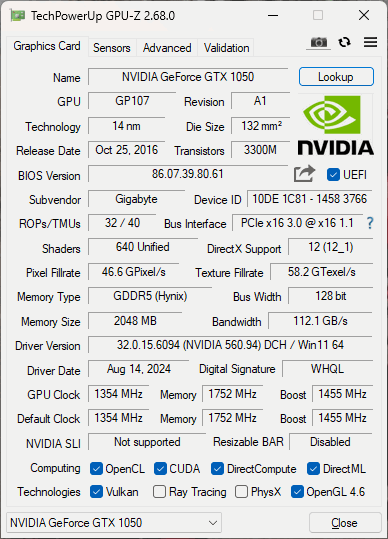
การ์ดจอ : NVIDIA GeForce GTX 1050
SSD : WDS500G3X0C-00SJG0
------------------
System Information
------------------
Time of this report: 1/3/2026, 12:43:14
Machine name: ---------
Machine Id: {3D206853-A60A-4F8A-A5B1-B46951D667EC}
Operating System: Windows 11 Pro 64-bit (10.0, Build 26100) (26100.ge_release.240331-1435)
Language: Thai (Regional Setting: Thai)
System Manufacturer: System manufacturer
System Model: System Product Name
BIOS: 5409 (type: UEFI)
Processor: AMD Ryzen 7 2700 Eight-Core Processor (16 CPUs), ~3.2GHz
Memory: 8192MB RAM
Available OS Memory: 8122MB RAM
Page File: 9352MB used, 4146MB available
Windows Dir: C:\WINDOWS
DirectX Version: DirectX 12
DX Setup Parameters: Not found
User DPI Setting: Using System DPI
System DPI Setting: 96 DPI (100 percent)
DWM DPI Scaling: Disabled
Miracast: Available, no HDCP
Microsoft Graphics Hybrid: Not Supported
DirectX Database Version: 1.7.7
Auto Super Res Version: Unknown
System Mux Support: Mux Support Inactive - Ok
Mux Target GPU: dGPU
Mux Incompatible List: Unknown
DxDiag Version: 10.00.26100.7309 64bit Unicode
DxDiag Previously: Crashed in system information (stage 3) & Direct3D (stage 1) & Diagnostics (stage 1). Re-running DxDiag with "dontskip" command line parameter or choosing not to bypass information gathering when prompted might result in DxDiag successfully obtaining this information
---------------
EVR Power Information
---------------
Current Setting: {5C67A112-A4C9-483F-B4A7-1D473BECAFDC} (Quality)
Quality Flags: 2576
Enabled:
Force throttling
Allow half deinterlace
Allow scaling
Decode Power Usage: 100
Balanced Flags: 1424
Enabled:
Force throttling
Allow batching
Force half deinterlace
Force scaling
Decode Power Usage: 50
PowerFlags: 1424
Enabled:
Force throttling
Allow batching
Force half deinterlace
Force scaling
Decode Power Usage: 0














CPU สเปคนี้จะขายเท่าไหร่ดี
รบกวนผู้รู้
การ์ดจอ : NVIDIA GeForce GTX 1050
SSD : WDS500G3X0C-00SJG0
------------------
System Information
------------------
Time of this report: 1/3/2026, 12:43:14
Machine name: ---------
Machine Id: {3D206853-A60A-4F8A-A5B1-B46951D667EC}
Operating System: Windows 11 Pro 64-bit (10.0, Build 26100) (26100.ge_release.240331-1435)
Language: Thai (Regional Setting: Thai)
System Manufacturer: System manufacturer
System Model: System Product Name
BIOS: 5409 (type: UEFI)
Processor: AMD Ryzen 7 2700 Eight-Core Processor (16 CPUs), ~3.2GHz
Memory: 8192MB RAM
Available OS Memory: 8122MB RAM
Page File: 9352MB used, 4146MB available
Windows Dir: C:\WINDOWS
DirectX Version: DirectX 12
DX Setup Parameters: Not found
User DPI Setting: Using System DPI
System DPI Setting: 96 DPI (100 percent)
DWM DPI Scaling: Disabled
Miracast: Available, no HDCP
Microsoft Graphics Hybrid: Not Supported
DirectX Database Version: 1.7.7
Auto Super Res Version: Unknown
System Mux Support: Mux Support Inactive - Ok
Mux Target GPU: dGPU
Mux Incompatible List: Unknown
DxDiag Version: 10.00.26100.7309 64bit Unicode
DxDiag Previously: Crashed in system information (stage 3) & Direct3D (stage 1) & Diagnostics (stage 1). Re-running DxDiag with "dontskip" command line parameter or choosing not to bypass information gathering when prompted might result in DxDiag successfully obtaining this information
---------------
EVR Power Information
---------------
Current Setting: {5C67A112-A4C9-483F-B4A7-1D473BECAFDC} (Quality)
Quality Flags: 2576
Enabled:
Force throttling
Allow half deinterlace
Allow scaling
Decode Power Usage: 100
Balanced Flags: 1424
Enabled:
Force throttling
Allow batching
Force half deinterlace
Force scaling
Decode Power Usage: 50
PowerFlags: 1424
Enabled:
Force throttling
Allow batching
Force half deinterlace
Force scaling
Decode Power Usage: 0